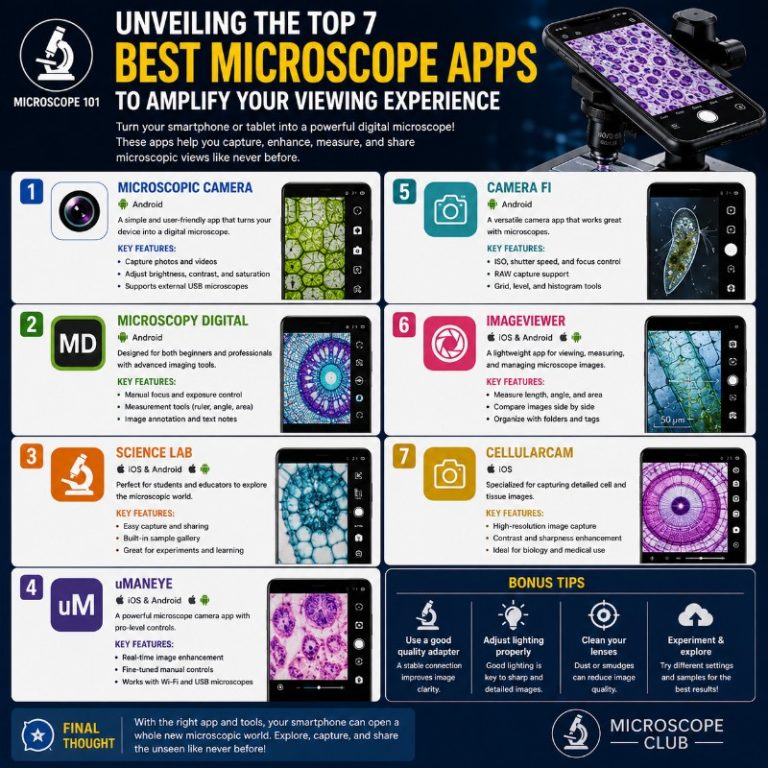
Microscope apps for smartphones use your phone’s camera and digital zoom to magnify small objects, fine print, and everyday details you’d otherwise miss — no hardware required. The best ones add freeze-frame, contrast filters, and flashlight control that make a real difference, but every app on this list is only as powerful as the camera behind it. Here’s what actually works in 2026, what doesn’t, and how to pick the right tool for your situation.
What “Microscope App” Actually Means (and the Zoom Ceiling)
Phone microscope apps are not optical microscopes. That distinction matters before you download anything.
A typical smartphone has one main lens with roughly 1x optical magnification. If your phone has a telephoto lens, it adds 3x–5x true optical magnification — the only kind that preserves image sharpness. Everything past the optical ceiling is digital zoom: the app crops and enlarges the sensor’s pixels, which loses detail and sharpens edges into mush.
Practical example: hold a pill bottle under your phone at 10x “digital zoom” on a midrange Android. The text is readable, but it looks like a 2004 JPEG — grainy, with colour fringing around high-contrast edges. At 5x digital on a good flagship it’s sharper, but still nowhere near what a 40x compound microscope delivers. What apps genuinely do well: lock focus at a fixed short distance, keep the flashlight steady, freeze the frame so you can read without your hand shaking, and apply contrast filters that make thin text pop. That’s the real job.
Bottom line: a “10x” app on a phone with no telephoto lens gives you 10x digital zoom — useful for reading, not for examining cells. If you need real magnification, skip to the clip-on lens section below.
The Best Microscope Apps for iPhone and Android
1. iOS Magnifier — Built-In, No Download (iPhone & iPad)
Apple’s built-in Magnifier app is the strongest free option for iPhone users, and almost nobody knows it’s already installed. The slider runs from 0% to 100%, where 100% equals roughly 10x magnification. Freeze a frame with a single tap, then pinch to zoom the frozen image further. Filters include contrast boost, invert, and several colour-separation modes. The flashlight is independently adjustable from the zoom.
On iOS 18, Magnifier gained Reader mode: point it at a label or document, tap Detect, and the app runs OCR on the text and displays it enlarged on a plain background — useful for medicine bottles, appliance manuals, and anything printed in a 6pt font. The freeze, multi-shot, and filter stack have been in Magnifier since iOS 14.
In testing on a standard iPhone 15 (no telephoto lens), Magnifier at max zoom renders fine print on packaging legibly — not beautifully, but legibly. Flashlight wash-out is the main frustration at close range; dimming it to 40–60% and pulling the phone back 5–8 cm gets a sharper result than going nose-to-screen with the flash on full. No download, no ads, no permissions anxiety.
Best for: any iPhone user wanting a quick, no-fuss magnifier. Replaces most apps on this list for iOS 14+.
Built into Settings → Accessibility → Magnifier on iOS 14+; standalone app icon on iOS 16+.
2. SuperVision+ Magnifier — iOS
SuperVision+ is developed by Massachusetts Eye and Ear, a Harvard-affiliated hospital, and it shows. The standout feature is live image stabilization: on-screen text stops swimming when your hand trembles, which matters enormously for low-vision users trying to read a menu or street sign. A vertical-stabilization mode is specifically designed for reading lines of text left-to-right without the camera drifting up or down.
It also has freeze, flashlight, focus lock, colour invert, and a clean one-handed UI. At 4.3 stars on the App Store with consistent recent updates, it’s actively maintained. For anyone who struggles with hand tremor — older users, people with essential tremor or a neurological condition — stabilization alone makes this the first app to try.
Best for: low-vision users, seniors, anyone with hand tremor.
Download SuperVision+ on the App Store
3. Cozy Magnifier & Microscopes (Hantor) — Android & iOS

Cozy Magnifier (by Hantor) is a reliable cross-platform pick that goes further than simple zoom control. Brightness and contrast are independently adjustable inside the app, so you can punch up contrast on a pale label without blowing out the highlights with a brighter flashlight. A photo-filter stack gives you seven or eight colour modes, and images can be frozen, saved, and reviewed in the built-in gallery.
The zoom bar is smooth and well-calibrated — at 5–7x digital zoom it’s easy to find the sweet spot between magnified and still-sharp. Above 8x on most phones the grain becomes distracting, so treat it as a 5–7x app in practice regardless of what the slider claims. The interface works fine on phones; tablet layouts are less polished.
Note: the Google Play package (com.hantor.CozyMag) is the same app regardless of whether you find it listed as “Magnifier and Microscopes” or “Cozy Magnifier” — they are identical. Some older app lists pair Cozy Magnifier with App Store ID 691435681, but that ID belongs to SuperVision+, which has its own entry above.
Best for: Android users wanting more image control than a basic zoom app provides.
4. Magnifying Glass + Flashlight — Android & iOS

This is the simplest app on the list in the best possible way. Open it and the flashlight is already on. Swipe up or down to adjust brightness; swipe left or right to change zoom. That’s the whole UI — no menus, no filters, nothing to configure. Tap to freeze the frame, tap again to resume live view. Max zoom is 5x.
In use, 5x feels about right for reading fine print on packaging. The controls are large enough to operate one-handed, and the flashlight activating instantly on launch is a practical advantage over apps that bury the torch in a settings menu. The downside: no contrast or colour filters, and no image saving — it’s purely a live-view tool. If you regularly need to read small text in dim light and want something you can open in three seconds, this is it.
Best for: quick one-handed magnification with minimal learning curve. Search “Magnifying Glass + Flashlight” on Google Play or the App Store to find it.
5. NowYouSee — Android & iOS (Colour Blindness Assist)

NowYouSee is not primarily a magnifier — it’s a colour-blindness correction and simulation tool that also includes standard zoom and flashlight controls. The core feature set is six correction filters (one for each major type of colour vision deficiency) and three simulation filters that let someone with normal vision see what a colour-blind person sees. There’s also a built-in colour identifier: point the camera at anything and a readout names the colour, which is useful for matching clothing, sorting wires, or reading coloured labels.
The magnification side is functional but unremarkable — standard digital zoom with no special processing. The colour blindness test links to a webpage rather than running inside the app, which is mildly clunky. For colour-blind users who also need magnification this is an obvious pick; for everyone else it’s the specialised tool, not the general one.
Note: some listings swap the store links for this app — search “NowYouSee” on Google Play (package: com.areyoucolorblind.nowyousee) or the App Store to make sure you land on the correct one.
Best for: colour-blind users; classroom demonstrations of colour perception.
6. Magnifying Glass — Android
Magnifying Glass (by BingHuo) is an Android-only app that gets two things right: up to 10x digital zoom controlled by a pinch or slider, and a colour-filter stack that includes a high-contrast mode useful for reading pale or faded text. The flashlight is easy to toggle. Controls are functional but small — operating the zoom bar at close range while holding the phone steady requires a bit of practice.
Realistic expectation on a midrange phone: at 10x digital zoom, text is readable but grainy. At 6–7x the image quality is noticeably better. In-app ads appear periodically. If you already know what you need this for — reading the serial number on the back of an appliance, checking the threading on a bolt — it does the job without fuss.
Best for: Android users wanting high digital zoom plus colour filters without paying. Search “Magnifying Glass” by BingHuo on Google Play.
7. BigMagnify Free — iOS

BigMagnify Free is an iPhone app with a specific strength: filters designed to make text stand out against a background rather than just enlarging the raw camera feed. The sharpen filter adds a white outline around characters and boosts contrast, which helps with overly-stylised fonts — the kind used in vintage packaging, handwritten labels, or low-contrast menus. There’s also an invert filter for white-on-dark text.
The downside is a UI that feels cluttered: semi-transparent controls sit over the live view and can be hard to find at a glance. If you’re using it in a rush — at a pharmacy counter, say — the buttons take a moment to locate. For dedicated text-reading situations at your desk it’s fine. For iPhone users already on iOS 14+, Magnifier’s built-in Reader mode (iOS 18) does the same text-extraction job without the clutter.
Best for: iPhones needing font-sharpening filters for stylised or faded text. Search “BigMagnify Free” on the App Store (ID: 393247466).
A Note on LogSat Microscope (iOS — Novelty)
The Microscope app by LogSat Software LLC frequently appears on older lists. It is not a magnification tool: it is a novelty/prank app, last updated in 2010, that loads pre-stored magnified images from a database rather than zooming your actual camera. It cannot “see your skin cells” or display anything in front of the phone. Mentioning it here only to save you the download.
App Comparison Table
| App | Platform | Price | Max Zoom | Freeze | Filters | OCR/Text | Stabilization | Maintained |
|---|---|---|---|---|---|---|---|---|
| iOS Magnifier (built-in) | iOS 14+ | Free (built-in) | ~10x | Yes | Yes | Yes (iOS 18) | No | Active (2024) |
| SuperVision+ | iOS | Free | ~10x | Yes | Yes | No | Yes | Active |
| Cozy Magnifier & Microscopes | Android, iOS | Free (ads) | ~10x | Yes | Yes | No | No | Active |
| Magnifying Glass + Flashlight | Android, iOS | Free | 5x | Yes | No | No | No | Active |
| NowYouSee | Android, iOS | Free | Standard | No | Colour-blind | No | No | Active |
| Magnifying Glass | Android | Free (ads) | 10x | Yes | Yes | No | No | Active |
| BigMagnify Free | iOS | Free | Standard | No | Text-sharpen | No | No | Active |
| LogSat Microscope | iOS | Free | N/A (novelty) | No | No | No | No | Abandoned (2010) |
Which App Should You Choose?
- Free + iPhone? Use the built-in Magnifier. It’s already there and it’s the best free iOS option.
- Low-vision user or someone with hand tremor? SuperVision+ — stabilization makes it the right tool regardless of platform.
- Android + want more image control? Cozy Magnifier & Microscopes (Hantor).
- Quickest possible launch with flashlight auto-on? Magnifying Glass + Flashlight.
- Colour blindness? NowYouSee — built for exactly that use case.
- Need actual high magnification for specimens, not just reading fine print? No app on this list will satisfy you — see below.
Microscope apps are also a great starter tool for microscopes for kids — letting children explore close-up views before moving to a proper instrument. For classroom use, pairing a phone app with ready-made prepared microscope slides gives a natural stepping-stone experience.
When Apps Hit Their Limit: Clip-On Lens Adapters
If you’ve hit the ceiling on digital zoom and want real magnification from your phone, a clip-on macro or microscope lens adapter is the honest upgrade. A clip-on lens (such as the Apexel 100x–200x model) physically attaches to the phone’s main camera and provides true optical magnification rather than a software crop.
The advertised magnification numbers are optimistic — independent tests put real-world magnification well below the box claim — but even at half the advertised value, you’re getting genuine optical magnification that shows detail no app zoom can resolve. The working distance is very short (a few millimetres) and alignment matters: it takes a few minutes to learn the clip placement. Once set, it works with any of the apps above.
For dedicated microscopy, the better path is a proper instrument. A USB microscope connects to a laptop or tablet and gives 20x–200x at reasonable image quality; a pocket microscope is portable without needing a phone at all. Both outperform any clip-on phone lens for regular use.
Frequently Asked Questions
Is there an app that works like a real microscope?
Not truly. Phone microscope apps use digital zoom — software cropping of the camera sensor — rather than optical lenses. They are useful for reading small text, examining surfaces, and quick close-up views, but they cannot achieve the resolution of a 40x or 100x compound microscope. For real specimens, a compound light microscope or USB microscope is the right tool.
Can I use my phone camera as a microscope?
Yes, within limits. Your phone camera can focus at close range and a magnifier app controls zoom and lighting. The practical ceiling on a standard phone is 5–10x digital zoom before image quality degrades. A clip-on macro lens extends that with genuine optics, though still far short of a lab microscope.
Does the iPhone have a built-in magnifier?
Yes. The Magnifier app has been part of iOS since iOS 10 (as an Accessibility feature) and became a standalone app icon with iOS 16. On iOS 18 it gained Reader mode for OCR text extraction. No download required.
How many times can a phone camera magnify?
Most phones have 1x optical on the main lens, 3x–5x if a telephoto lens is present. Digital zoom goes higher (10x, 30x, even 100x on flagship phones) but loses sharpness above the optical ceiling. For a reading or inspection task, 5–7x digital on a modern phone is the usable sweet spot.
Are microscope apps real microscopes?
No. They enhance and control your phone’s camera but cannot overcome the physical limits of a small smartphone sensor and lens. They are better described as magnifier apps. For the types of microscopes that provide real magnification, purpose-built instruments are the answer.
Conclusion
Smartphone microscope apps are genuinely useful for reading fine print, inspecting surfaces, and everyday close-up tasks — but only when you go in with accurate expectations. Every “10x zoom” in this list is digital magnification riding on your phone’s existing camera hardware; the app controls the experience, not the optics. For iPhone users, the built-in Magnifier app handles most jobs before you need to download anything. Android users get the best results from Cozy Magnifier (Hantor) or Magnifying Glass for more zoom, and SuperVision+ is the standout pick for anyone dealing with low vision or hand tremor. If apps consistently fall short for what you need to see, a clip-on lens adapter or a dedicated USB microscope is the honest next step.
Originally posted 2020-07-04 10:03:47.