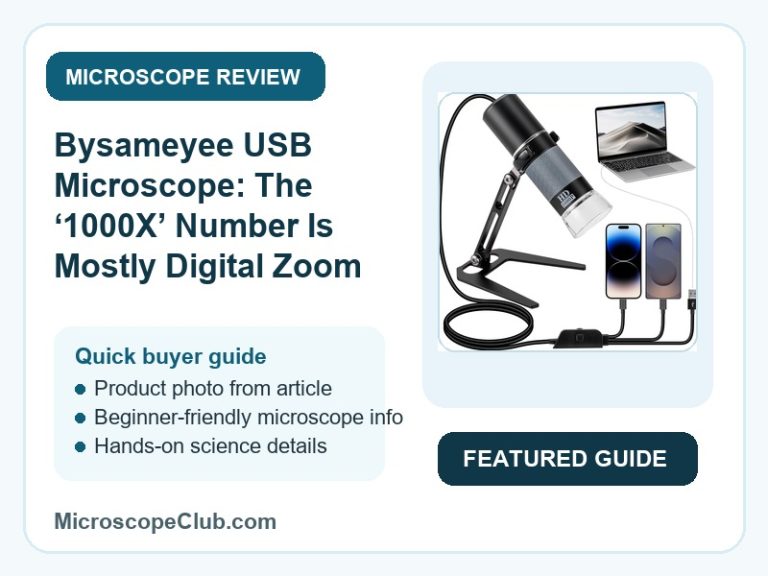
The Bysameyee 1080P USB Microscope is a capable, budget-friendly pick for soldering work, coin collecting, and casual close-up viewing — but this Bysameyee USB microscope review comes with one big caveat: expect digital zoom at the top end, not true 1000X optics. Reviewers consistently praise the sharp working-range image quality, the sturdy metal stand, and dead-simple setup on Windows and Android, while iPhone compatibility remains genuinely unreliable despite what the listing promises. If you want an affordable way to inspect PCBs, coins, and skin up close on a PC or Android device, it earns its keep; if you need guaranteed iOS support or lab-grade optical precision, look elsewhere.

✅ Pros
- Consistently rated as excellent value for money, with 19 of 19 tracked mentions positive
- Sharp, true-to-color image quality at normal working-distance zoom levels
- Simple setup — plugs in and registers as a webcam on PC with no app required
- Metal desktop stand is a noticeable upgrade over the plastic stands bundled with competing scopes
- Genuinely useful for soldering, PCB inspection, and coin/collectible detail work
❌ Cons
- iPhone/iOS compatibility is unreliable — 11 of 26 tracked compatibility mentions are negative
- Focusing wheel is fiddly and needs a steady hand or a mounted stand to get sharp results
- The advertised 1000X figure is mostly digital zoom, not true optical resolution
- At least one buyer reports total connection failure around the five-month mark, just past the return window
- Companion apps are inconsistent — the Android app is ad-heavy and the Windows app is hard to track down
What to Look for in a USB Digital Microscope
Magnification range is the number every listing leads with, but it’s the least reliable spec on the page. The Bysameyee lists 50X-1000X, and reviewers confirm the low-to-mid range delivers genuinely crisp detail, while the top-end figure leans heavily on digital cropping rather than added optical resolution. When comparing USB microscopes, treat the printed maximum as a marketing ceiling and judge the device on its usable mid-range performance instead — our roundup of the best digital microscopes breaks down which magnification claims across the category actually hold up.
Illumination matters just as much as magnification. The Bysameyee’s 8 built-in LEDs are controlled by a brightness wheel on the cable itself, which reviewers use to manage glare on reflective subjects like coins and solder joints — a detail that separates a usable scope from a frustrating one. Focusing mechanism and build material round out the checklist: a metal stand and a smooth focus ring reduce the hand-shake blur that plagues cheaper plastic-stand kits, though even a good stand can’t fully compensate for a narrow depth of field at high zoom.
Finally, check device compatibility and the software ecosystem before buying, not after. A USB microscope is only as good as the app or driver that renders its feed, and cable format (USB-C, USB-A, Micro-USB, Lightning) determines whether it’ll actually work with the devices you already own.
Who Should Buy a USB Digital Microscope?
Hobbyists and DIY repairers are the core audience for this category. Anyone soldering circuit boards, inspecting connector pins, or checking small mechanical parts benefits from a live, zoomed feed on a laptop screen rather than squinting through a handheld loupe — and a USB microscope’s webcam-style output makes screen recording and photo documentation trivial.
Students, educators, and collectors form the second big group: coin and stamp collectors examining mint marks, parents letting kids explore pond water and fabric fibers, and classroom demonstrations that need a shared screen view instead of one eye per microscope. The one group that should shop carefully is iPhone-first buyers — device support in this category is inconsistent enough that it’s worth checking compatibility claims against real reviews before buying, as we cover in our guide to the best iPhone-compatible microscopes.
Who This Is For
This is the right pick for hobbyist electronics repairers, coin and collectible enthusiasts, and casual or educational users working from a Windows PC, Android phone, or tablet who want an inexpensive way to zoom into small objects. It’s not the right pick for iPhone-first buyers expecting seamless plug-and-play, or anyone who needs scientific-grade optical precision or proven multi-year industrial durability.

Full Specifications
| Spec | Value |
|---|---|
| Light Source Type | LED |
| Magnification Maximum | 1000 x |
| Objective Lens Description | 50X-1000X |
| Power Source | USB Powered |
| Item Weight | 300 Grams |
| Enclosure Material | Metal |
| Color | Black |
| Brand | Bysameyee |
| Unit Count | 1.0 Count |
Optical Performance and Magnification
The Bysameyee 1080P USB Microscope delivers its sharpest detail in the mid-range of its 50X-1000X spread, where the 1080P sensor resolves mint marks, solder joints, and fabric fibers cleanly. One reviewer summed it up directly: the “1000X” zoom is “about 5X closer than the 50X zoom,” meaning the top of the range is achieved through digital cropping rather than added optical power — a distinction worth understanding before you buy, and one that general microscopy magnification tutorials explain well for anyone new to the difference between optical and digital zoom.
The Bysameyee 1080P USB Microscope manages glare and contrast through its 8 built-in LED lights, adjustable via a brightness wheel built into the USB cable. Buyers checking coins and other reflective surfaces report that dialing the brightness down reduces washout and reveals surface texture that gets blown out under full illumination. The tradeoff is that the light cone sits close to the lens, so very shiny or very small recessed subjects — like the inside of a connector port — can be harder to light evenly than a flat coin or PCB.
Build Quality and the Metal Stand
The Bysameyee 1080P USB Microscope ships with a metal enclosure and a matching metal desktop stand instead of the plastic hardware common at this price point. At 300 grams, the scope itself is light, but the stand’s weight and grip pads keep the whole rig from sliding during close-up work — reviewers specifically call out the stand as “vastly better than the cheap plastic one on my previous microscope.”

The Bysameyee 1080P USB Microscope controls focus through a manual focus ring rather than autofocus, which trades convenience for zero focus-hunting lag but demands a steady hand at higher zoom. Several reviewers describe the focus wheel as “tricky on focusing unless you have steady hands,” and note that pairing the unit with a proper stand — rather than holding it freehand — is what actually makes fine focusing manageable.
Device Compatibility and Software
The Bysameyee 1080P USB Microscope connects through a 4-in-1 cable covering USB-C, USB-A, Micro-USB, and Lightning, letting one unit physically plug into most laptops, Android phones, and tablets. On Windows and Android with OTG enabled, multiple reviewers report the scope is recognized directly as a webcam with no software install required, which is the smoothest path to getting an image on screen.
The Bysameyee 1080P USB Microscope relies on third-party apps — CameraFi on Android and xploview.exe on Windows — for recording and snapshot features beyond basic live view, and reviewers flag both as inconsistent: the Android app is described as “advertisement-forward,” and the Windows download had to be tracked down outside the manufacturer’s own link. iPhone support is the weakest link entirely, with reviewers reporting the device “doesn’t work with iOS 26” and requires hunting for a compatible third-party app despite the listing’s iPhone compatibility claim.
What Customers Say
The Bysameyee 1080P USB Microscope holds a 4.1 out of 5 average across 762 reviews, and the sampled feedback skews strongly positive — the large majority of reviews land at 4 or 5 stars, with occasional 1- and 3-star reports centered on durability and overstated magnification rather than day-one defects. One verified buyer wrote: “This Microscope gave a major improvement to my soldering workflow, for electronics projects and repairs.” Another, reviewing it for coin collecting, noted: “The image quality is sharp enough at normal working distances to see mint marks, plating issues, and surface texture clearly.” A more critical reviewer cautioned: “Magnification is definitely not as powerful as advertised… The lights create a reflection that sometimes blocks the image.”
Our review-integrity read on this listing is LOW-MEDIUM risk — the negative feedback on compatibility and focusing is visible and proportionate rather than suppressed, which argues against wholesale manipulation, but the full 762-review population couldn’t be pulled for a complete audit, so treat this as a partial read rather than a clean bill of health. If you want to run your own check before buying, third-party review analysis tools can flag unverified-review clustering and posting-velocity patterns across the full review set.
Final Verdict
CONSIDER: the Bysameyee 1080P USB Microscope is a solid buy for hobbyist soldering, coin inspection, and casual educational use on a Windows or Android device, where its metal stand, adjustable LEDs, and sharp mid-range image quality punch above its budget-friendly price point — but skip it if you need reliable iPhone support, true optical performance at the advertised 1000X ceiling, or confidence it’ll still be working past the return window.
Frequently Asked Questions
Why doesn’t the app display any image when the microscope is connected?
Check that the LED light on the microscope is actually on — if it isn’t, reconnect the cable. Also confirm the OTG function is enabled on your phone or tablet, since the microscope needs OTG access to register as a camera device on Android.
Why does the image look blurry, and how do you fix it?
First remove the plastic dust cover from the lens if it’s still attached. If the image is still soft, rotate the focus wheel slowly to find the best viewing distance for your zoom level — the sweet spot shifts as you move between the low and high end of the 50X-1000X range.
What causes black spots on the screen?
Black spots are almost always dust on the lens rather than a sensor defect. Tapping the microscope body lightly is usually enough to dislodge the particle and clear the image.
Why does the video feed lag or stutter?
Low phone battery is the most common cause reported by the manufacturer — keep your device above 30% charge when using the microscope, since the USB connection draws power while streaming video.
Does the Bysameyee microscope work as a plug-and-play webcam without installing an app?
On Windows, yes — reviewers confirm the device is detected automatically as a standard webcam, so no software download is required for basic live viewing. Android and iOS both typically require a companion app, and iPhone support in particular is unreliable regardless of app choice.
What’s included in the box?
The package includes the USB microscope with its 4-in-1 cable, a metal stand, and a printed user manual. No additional accessories, slides, or calibration tools are bundled.
Conclusion
The Bysameyee 1080P USB Microscope suits hobbyist repairers, coin collectors, and curious PC or Android users who want an affordable window into the small-scale world, provided they treat the 1000X spec as a digital-zoom ceiling rather than a lab-grade guarantee. Buyers who need certified iPhone support or years of daily industrial use should look at higher-tier alternatives instead.
If you’ve used a USB microscope like this one for soldering, coin collecting, or classroom demonstrations, share what worked — or didn’t — in the comments below. For more on choosing a scope that fits in a bag or a desk drawer, see our guide to the best pocket microscopes.
Originally posted 2026-07-06 09:00:00.