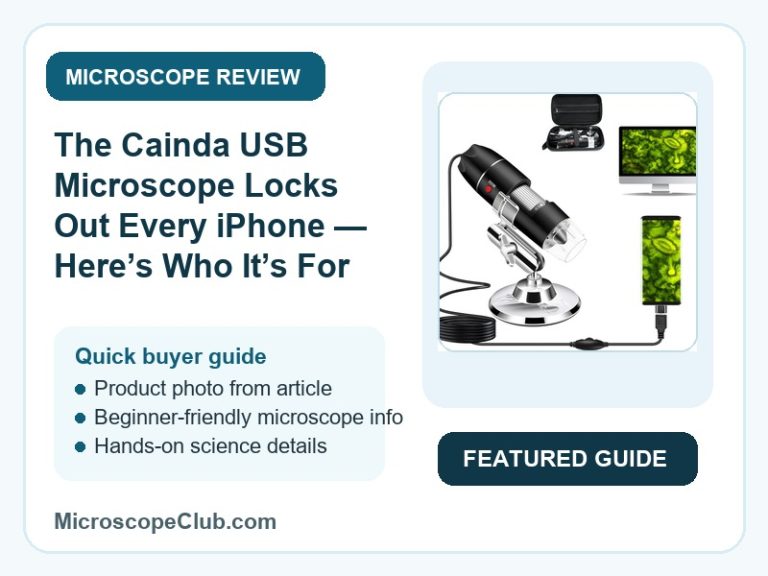
This Cainda USB microscope review confirms the product earns its 4.0-star average by doing exactly what a budget wired scope should: turning a Windows PC, Mac, or OTG-capable Android phone into a passable inspection tool for PCBs, coins, and classroom biology, though real-world clarity tops out well below the “1000x” figure the listing leads with. It’s an easy recommend for buyers who want a first digital microscope without lab-grade expectations — but iPhone and iPad owners should stop reading now, since the device flatly will not work with their hardware.

✅ Pros
- Plug-and-play on Windows — several reviewers report no driver install required at all
- Connects straight to OTG-capable Android phones over USB-C with no extra adapter needed
- 8-LED ring light is adjustable, so brightness can be dialed down for close-up subjects
- Image quality draws direct praise from reviewers comparing it to a standalone camera
- Bundle includes a metal stand, carrying case, ruler, and OTG adapter for the price of the scope alone
❌ Cons
- The bundled metal stand is flimsy enough that even a satisfied 5-star reviewer called it out
- No iPhone or iPad support whatsoever — Windows, Mac, Linux, or OTG-capable Android only
- Dialing in focus and magnification takes a learning curve before results are consistent
- Advertised 40x–1000x (and 50x–1600x per the spec sheet) magnification overstates real-world clarity
- A protective lens cover ships installed and must be removed first, or the image never focuses
What to Look for in a USB Digital Microscope
Magnification numbers on USB microscope listings are notoriously inflated, and the Cainda is a good example: the bullet points advertise 40x–1000x while the spec sheet separately lists a 50x–1600x objective lens description. Neither number reflects the resolution you’ll actually see on screen — what matters more is the working distance (0–90mm here), which determines how close the lens needs to sit to your subject before it can focus at all, and the frame rate (max 30fps at 600 lux), which decides whether the live image is smooth enough to work with under normal room lighting.
Illumination is the second factor that separates a usable USB scope from a frustrating one. The Cainda uses 8 adjustable LEDs built into the lens housing, which lets you dial brightness down for reflective or close-up subjects — a control that reviewers specifically praised, since fixed-brightness ring lights on cheaper scopes tend to wash out detail. If you’re comparing this unit against other options in the category, our roundup of the best digital microscopes breaks down how illumination and sensor quality trade off against price across several models.
Finally, check what the stand and accessories actually deliver versus what the listing promises. The Cainda ships with a metal tripod stand, an OTG adapter, a printed ruler for scale reference, a driver CD, and a carrying case — a genuinely complete accessory set for the price — but a metal stand isn’t automatically a stable one, and multiple reviewers flagged it as too light for vibration-free shots at higher zoom.
Common Uses for a USB Digital Microscope
USB microscopes in this price bracket suit hobbyists, students, and DIY/repair users who want to inspect small objects — PCBs, coins, insects, jewelry, skin, or hair — without the cost or bulk of an optical lab microscope. They’re a strong fit for a first purchase where “good enough” clarity at low cost matters more than pinpoint optical precision, and where the live feed on a laptop or phone screen is more useful than looking through an eyepiece.
Who This Is For
The Cainda USB microscope fits students, hobbyists, and repair/inventor types who already own a Windows PC, Mac, Linux box, or an OTG-capable Android phone and want an affordable way to inspect PCBs, coins, jewelry, insects, or skin and hair up close. It’s not the right pick for anyone expecting lab-grade optical precision, a rock-solid stand for long documentation sessions, or any form of iPhone/iPad compatibility.
It’s also a poor fit for anyone who needs iOS support: like most wired USB scopes in this category, it doesn’t work with iPhone or iPad at all, only Windows, Mac, Linux, and OTG-capable Android. If iOS compatibility is a hard requirement, skip straight to our comparison of the best iPhone-compatible microscopes instead of working around this device’s limitation.

Full Specifications
| Spec | Value |
|---|---|
| Light Source Type | LED |
| Real Angle Of View | 3.0 |
| Magnification Maximum | 1000 x |
| Voltage | 5 Volts |
| Compatible Devices | Personal Computers, Mac, Linux, Android Smartphones |
| Objective Lens Description | 50x-1600x magnification, 0-90mm working distance |
| Power Source | Corded Electric |
| Item Dimensions L x W x H | 19L x 12W x 2.5H centimetres |
| Item Weight | 0.27 Kilograms |
| Enclosure Material | Metal |
| Color | Black |
| Model Name | USB-Mikroskop-Kamera |
| Brand | cainda |
| Manufacturer Part Number | X10 |
Optical Performance & Magnification
The Cainda X10 delivers its image through an 8-LED ring light built directly into the lens barrel, with brightness controlled by a wheel so users can back off intensity for close, reflective subjects rather than being stuck with a single fixed output. This adjustability was one of the most consistently praised features in customer feedback, since fixed-brightness competitors tend to blow out highlights on shiny or metallic samples.
The Cainda X10 supports a 1mm to 90mm working distance, which sets how far the lens can sit from a subject and still resolve a sharp image — a wider working distance than many pocket-sized USB scopes, and one reason it copes reasonably well with both flat samples (coins, circuit boards) and slightly raised ones (insects, jewelry). Frame rate tops out at 30fps under 600 lux, which is enough for smooth live-view focusing in a normally lit room but will drop noticeably in dim conditions.
The Cainda X10 markets a 40x–1000x range on the box and a separate 50x–1600x figure in its objective lens spec — two numbers that don’t agree with each other, which is itself a signal that neither should be read literally. As with most budget digital scopes in this category, real usable clarity sits well below the top of either range; magnification specs in this category are a marketing convention more than a measured optical spec, a distinction covered in more technical depth in the Wikipedia overview of digital microscope technology.
Setup, Compatibility & Software
The Cainda X10 connects over USB2.0 and is recognized natively as a camera on Windows without a driver install, according to multiple reviewers — one described plugging it in and getting a working feed with no CD or downloaded software needed. Mac users get similar plug-and-play behavior through the built-in Photo Booth app, and Linux support extends to kernels 2.6.26 and above, including Raspberry Pi running current Raspbian builds.
The Cainda X10 works with Android smartphones that support OTG (USB On-The-Go), connecting directly via USB-C in at least one reviewer’s setup with no separate OTG cable required, once paired with an OTG viewer app from Google Play. What it does not do, under any configuration, is work with an iPhone or iPad — the listing states this outright, and it’s a hard exclusion rather than a workaround-able limitation.
The Cainda X10 requires the included transparent lens cover to be removed before use, per an explicit warning in the listing — leaving it on prevents the scope from focusing at all, which reads as a preemptive fix for what was likely a recurring return or support complaint before the warning was added.
Build Quality & Included Accessories
The Cainda X10 uses a metal enclosure for the scope body itself, weighing in at a light 0.27 kilograms, which keeps it easy to hold one-handed for freeform inspection work. That same lightness works against it on the included stand, though — one reviewer who otherwise rated the scope 5 stars specifically called out that the stand is “very light” and shakes with the smallest movement, undermining otherwise-sharp images at higher zoom.
The Cainda X10 ships with a genuinely complete accessory set for its price point: a metal tripod stand, a USB/Micro-USB 2-in-1 cable plus a separate Type-C adapter, a printed ruler for scale reference, a driver CD, a user manual, and a carrying case to keep everything together. It’s a more thorough bundle than many competitors offer at the same price, even accounting for the stand’s stability issue.
What Customers Say
The Cainda USB microscope holds a 4.0 out of 5 average across 4,953 ratings on Amazon. The sample of full-text reviews available for this analysis skewed heavily positive — six reviews were captured and all six were 5-star, verified purchases — which is too small and too skewed to represent the full sentiment split across nearly 5,000 ratings, so treat the following as illustrative rather than exhaustive.
One reviewer summed up the plug-and-play experience plainly: “Kamera ausgepackt – USB verbunden – fertig” (unpacked the camera, connected the USB, done) — no driver CD or downloaded software needed. Another verified buyer praised the image quality directly: “The picture quality is amazing just like adjusting on my camera based on depth or distance from lense,” while adding that “the maximum illumination way too bright for any of my close up samples” until dialed down. A third reviewer called it “a good quality microscope/ digital camera” and “a good value for the money.”
Fake-review risk here is rated LOW: the sampled reviews are written in distinct voices across multiple languages with specific, product-relevant detail (stand rigidity, light brightness, OS-specific driver behavior) rather than templated filler, and all carry Verified Purchase badges. That said, one review — “5 Stars says it’s a great product” — is generic enough to look boilerplate, and a sample of 6 out of 4,953 reviews can’t rule out review manipulation across the full base. Readers who want to understand how fake-review patterns typically show up can reference the Wikipedia entry on review fraud as general background.
Final Verdict
CONSIDER: the Cainda USB microscope is a reasonable buy for Windows, Mac, Linux, or OTG-Android users who want an affordable, driver-free way to inspect small objects and are willing to swap the stand for something sturdier if precision matters — but it’s an automatic AVOID for anyone on iPhone or iPad, since the device simply will not connect to that hardware under any workaround.
Frequently Asked Questions
Does the Cainda USB microscope work with an iPhone or iPad?
No. The listing states outright that it doesn’t work with iPhone, iPad, or any Android device that lacks OTG (USB On-The-Go) support. It only connects to Windows, Mac, Linux, and OTG-capable Android phones over a wired USB connection.
What is the real magnification range?
The listing advertises 40x to 1000x in its bullet points, while the separate spec sheet lists 50x to 1600x for the objective lens. The two figures don’t match each other, which is a sign neither should be taken literally — expect usable clarity well below either number, consistent with most digital microscopes at this price.
Do I need to install a driver on Windows?
Based on reviewer reports, no — multiple users describe the scope being recognized automatically as a camera device on Windows as soon as it’s plugged in, with no CD or downloaded driver required.
Can I use this microscope with my Android phone?
Yes, provided your phone supports OTG. One reviewer connected it directly via USB-C on a Samsung Note 10 without needing a separate OTG cable, then used a USB camera app from the Google Play Store to view the feed.
Why won’t my image come into focus?
Check that the transparent protective lens cover has been removed first — the listing explicitly warns that leaving it in place prevents the scope from focusing at all. This is a common first-use mistake rather than a defect.
Is the included stand sturdy enough for detailed work?
Not especially. Even a reviewer who rated the product 5 stars overall specifically flagged the metal stand as too light, noting it shakes with small movements. For vibration-free shots at higher zoom, a third-party mount is worth considering.
What comes in the box?
The package includes the USB/Micro-USB 2-in-1 microscope, a Type-C adapter, a metal tripod stand, a driver CD, a printed ruler, a user manual, and a carrying case.
Conclusion
The Cainda USB microscope suits students, hobbyists, and repair-minded buyers on Windows, Mac, Linux, or OTG-Android who want an affordable, driver-free scope for PCB, coin, and specimen inspection — as long as they’re prepared to work around a wobbly stand and temper expectations against the inflated magnification claims. It’s a firm pass for iPhone and iPad owners, full stop.
If you’ve used this scope or a comparable budget model, drop a comment with what you’re inspecting and how it’s holding up — it helps other readers gauge real-world performance beyond the spec sheet. For a closer look at how it stacks up against another budget option, see our PalliPartners 2000X review.
Originally posted 2026-07-10 09:00:00.