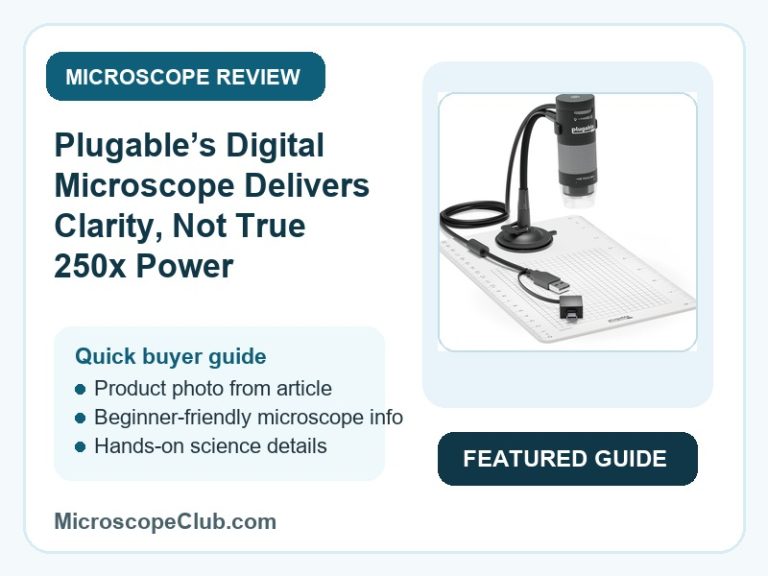
This Plugable USB digital microscope review lands on a clear verdict up front: it’s a solid pick if you want a plug-and-play way to inspect small objects on a laptop screen, but it is not the 250x lab-grade instrument its box art implies. Across thousands of buyer ratings it holds a 4.2-star average, with owners praising the sharp image and dead-simple setup while a smaller group reports the true usable magnification feels closer to a handheld loupe than a microscope. If you go in expecting a capable digital magnifier for hobby, solder, and collectible work rather than scientific-grade optics, it delivers exactly what most reviewers say it delivers.

✅ Pros
- Image clarity that reviewers describe as sharp and detailed without needing to be pressed right up against the subject
- Genuine value at the street prices many buyers actually paid, well below the full list price
- Plug-and-play setup on Windows, Mac, and Linux via standard webcam drivers — no proprietary software required
- Sturdy, fully adjustable flexible arm stand that holds position without drifting
- Real niche utility for entomology, soldering, jewelry hallmark inspection, and coin or stamp collecting
❌ Cons
- Advertised 250x magnification overstates real-world detail — several buyers describe the usable range as closer to a 10x magnifier
- Poor, uncorrectable contrast when viewing metallic or reflective surfaces
- USB2 ports can under-power the camera and LED together, causing random disconnects — a USB3 port is recommended
- LED halo light sits close enough to the lens to cause glare and flare on some subjects
What to Look for in a USB Digital Microscope
Magnification range is the number shoppers fixate on, but the figure printed on the box rarely matches what the sensor can actually resolve. A stepless zoom sounds impressive, yet a 2MP webcam-class sensor behind that zoom will run out of usable detail well before the marketed maximum — which is exactly the gap several Plugable owners flagged when they expected 250x optical-microscope clarity and got something closer to a strong loupe.
Illumination matters just as much as the lens. A ring of LEDs mounted too close to the objective throws glare back into the frame, especially on shiny, metallic, or glossy subjects — a limitation that shows up across nearly every budget digital microscope, not just this one. Look for models that let you dim the LEDs independently, since lower brightness with ambient room light often produces a cleaner image than running the halo at full power.
Mounting and power delivery round out the buying checklist. A flexible arm stand needs enough rigidity to hold focus without drifting, and any USB microscope that combines a camera sensor with onboard LEDs needs a data port capable of feeding both — USB2 ports frequently cannot, which is why intermittent shutoffs are one of the most common complaints in this category. For a full breakdown of what separates the reliable models from the disappointing ones, see our USB microscope buying guide.
Who Should Buy a USB Digital Microscope?
Hobbyists and technicians who need to inspect small objects without the cost and learning curve of a true optical microscope are the core audience for this category. Solderers checking circuit board joints, jewelry inspectors verifying hallmarks, and coin or stamp collectors documenting condition all get real, practical value from a webcam-based digital microscope, since the goal is usually “see it clearly on screen,” not lab-grade measurement.
Educators and parents introducing children to the microscopic world are the other major buyer group, and a USB microscope’s plug-and-play nature and large on-screen image make it far less fiddly than a traditional eyepiece scope for younger users. If the buyer in mind is specifically a child or classroom, it’s worth comparing this category against dedicated options in our guide to the best microscopes for kids, since some of those are built around durability and simplicity in ways a general-purpose USB microscope is not.
Who This Is For
This microscope suits hobbyists, electronics and solder technicians, jewelry and coin inspectors, and educators who want a simple, low-cost way to view small objects on a laptop and are comfortable treating it as a “digital magnifying glass” rather than a lab-grade instrument. It’s a poor fit for anyone who needs precise metallic-surface contrast, smooth video capture, or true 250x scientific resolution — and it works best paired with a USB3 port rather than USB2.

Full Specifications
| Spec | Value |
|---|---|
| Light Source Type | LED |
| Real Angle Of View | 45 Degrees |
| Magnification Maximum | 250.00 |
| Voltage | 5 Volts |
| Compatible Devices | Laptop |
| Objective Lens Description | 250x stepless magnification |
| Power Source | USB Bus Power |
| Item Dimensions L x W x H | 8.9L x 3.2W x 3.2H centimetres |
| Item Weight | 2.9 Ounces |
| Enclosure Material | Plastic |
| Color | Black |
| Model Name | USB DIGITAL MICROSCOPE |
| Brand | Plugable |
| UPC | 819927010784 |
| Global Trade Identification Number | 00819927010784 |
| Manufacturer Part Number | USB2-MICRO-250X |
| Unit Count | 1 Count |
Optical Performance and Magnification
The Plugable USB2-MICRO-250X delivers a stepless 60x to 250x zoom range through a 2-megapixel webcam-class sensor paired with a fixed focusing ring. That combination produces genuinely sharp results in the lower and middle part of the zoom range — one reviewer called it “extremely clear” without needing to press the lens right up against the subject — but the top end of the advertised range is where expectations and reality diverge most.
The Plugable USB2-MICRO-250X falls short of true 250x optical-microscope resolution because the underlying sensor is closer to a 640×480-class chip with digital interpolation layered on top, according to buyer testing. One buyer put it bluntly: “I didn’t like the fact that it didn’t give the up to 200X magnification I expected. Looks more like 10X. A magnifier not a microscope.” That’s a fair characterization for anyone expecting scientific-grade detail, though it doesn’t undermine the device’s usefulness for the hobby and inspection tasks it’s actually marketed toward. For a technical primer on how objective lenses and resolving power actually relate to magnification claims, Nikon’s MicroscopyU is a good reference point.
Lighting and Image Clarity
The Plugable USB2-MICRO-250X illuminates subjects through a built-in LED halo light with adjustable brightness across a 0-38 lumen range at a 7000K color temperature. In practice, buyers found the picture “sharp and clear” with “smooth adjustments” once the light level was dialed in, and one owner specifically used it for micro-soldering work where consistent illumination on small joints matters.
The Plugable USB2-MICRO-250X does introduce glare on reflective and metallic subjects because the LED ring sits close to the lens housing — a limitation one reviewer described as “HORRIBLE” contrast when trying to inspect stainless steel pins, adding that the issue “can not be regulated” through software. That same reviewer noted a phone camera with an inexpensive loupe produced better color and contrast control for that specific metallic use case, which is worth weighing if precision metal inspection is the primary goal.
Build, Mounting, and Compatibility
The Plugable USB2-MICRO-250X mounts through a flexible arm stand and includes an observation pad, giving it both a hands-free desktop setup and a handheld option for quick grab-and-go inspection. Buyers consistently describe the arm as sturdy enough to hold a chosen angle without drifting, and the compact housing — under 3 ounces and roughly the size of a small torch — makes it easy to store or travel with.
The Plugable USB2-MICRO-250X connects across Windows, Mac, Linux, and ChromeOS 108+ using standard webcam drivers, which is why setup reports skew toward “plug and play” rather than driver hunting. The one recurring compatibility caveat is power: because the device draws power for both the camera and the LED halo over the USB connection, a USB2 port can starve that combined load and cause the camera to randomly cut out. Reviewers who moved the same unit to a USB3 port reported the disconnection issue disappeared entirely, so it’s worth checking which port type is free on your machine before setup.
What Customers Say
The listing carries a 4.2 out of 5 star average across 6,303 ratings. In the review sample available for this analysis, sentiment ran strongly positive — roughly 85% rated 4 or 5 stars — with a smaller mixed-to-negative share centered on the magnification and contrast complaints detailed above. One verified buyer wrote, “Ease of use. Plug and play really. On screen picture is sharp and clear. Adjustments are smooth.” Another, using the device for entomology work, said it was “more accurate and detailed than a magnifying glass” for examining termite anatomy. A more critical reviewer countered that the contrast issues on metal objects were “HORRIBLE” and could not be corrected.
Review integrity risk here is LOW — the sample shows organic variation in length, tone, and geography, with specific product-use details (termite anatomy, USB2 vs USB3 power draw, driver installation steps) even in the most positive reviews, and no signs of a coordinated review campaign. For general guidance on spotting review manipulation on any listing, the FTC’s endorsement guidance is a useful reference.
Final Verdict
CONSIDER this one if you’re buying it as a digital magnifier for hobby, solder, or collectible inspection work and can plug it into a USB3 port — the image clarity, ease of setup, and flexible stand deliver real value for that use case. AVOID it if your priority is genuine 250x scientific-grade resolution or precise color and contrast on metallic surfaces, since both of those expectations are where the product consistently underdelivers against its own marketing.
Frequently Asked Questions
Does the Plugable USB2-MICRO-250X really magnify up to 250x?
The device is rated for 60x to 250x stepless magnification, but the usable detail at the top of that range is limited by its 2MP webcam-class sensor. Multiple buyers report the practical resolving power feels closer to a strong 10x magnifier than a true 250x optical microscope, so treat the number as a maximum zoom setting rather than a guarantee of proportional detail.
Does it work on Mac and Linux, or just Windows?
Yes — it uses a standard webcam chipset and sensor, so it works with any operating system that supports generic webcam software, including Windows, Mac, and Linux, plus ChromeOS 108 or later. No proprietary drivers are required for basic use.
Why does the camera randomly disconnect or shut off?
This typically happens when the microscope is plugged into a USB2 port, which can’t reliably supply enough power for the camera and LED halo light running together. Buyers who experienced random shutoffs reported the problem disappeared after switching to a USB3 port.
Can I record video with it, or only take photos?
It can capture both, but reviewers note the live video refresh is noticeably slow, making it better suited to still images of stationary subjects like circuit boards, coins, or jewelry than to smooth moving video.
What’s included in the box?
The package includes the USB digital microscope itself, a flexible arm observation stand, an observation pad for stabilizing the camera during close-up work, and the USB cable (with USB-C/Thunderbolt connector options).
Is it good for inspecting metal or reflective objects?
Not particularly. The LED ring sits close to the lens, and reviewers report that contrast on metallic and reflective surfaces can look washed out in a way that can’t be adjusted through software. If precise metal-surface inspection is your main use case, this is the weakest area of the product.
Does Plugable offer support if something goes wrong?
Yes — the listing states the device comes with lifetime support from Plugable’s North American connectivity support team, which is a notable inclusion at this price point for a device that relies on driver and OS compatibility to function.
Conclusion
The Plugable USB digital microscope earns its 4.2-star average by doing one job well: giving hobbyists, technicians, and collectors a simple, plug-and-play way to see small objects clearly on a screen. It’s not a substitute for a real optical microscope, and buyers chasing true 250x scientific detail or clean metallic contrast should look elsewhere, but for solder work, jewelry inspection, coin collecting, or introducing kids to magnified viewing, it holds up to its price point.
Have you used this microscope for a specific hobby or repair task? Share what worked (or didn’t) in the comments below — and if you’re weighing this against other brands before you buy, our guide to the best microscope brands is a good next stop.
Originally posted 2026-07-27 09:00:00.