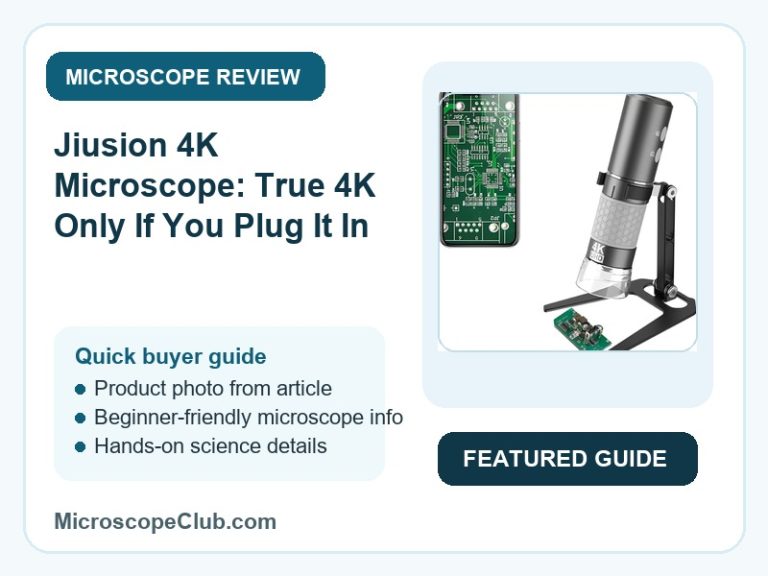
This Jiusion 4K WiFi microscope review lands on a qualified recommendation: it delivers genuinely sharp 4K capture over its wired USB connection and bundles a metal stand that reviewers rate more highly than the camera itself, but the wireless streaming mode — the feature most buyers actually want — reportedly caps well below the resolution on the box. For hobbyists, students, and light electronics repair work done mostly at a desk with a laptop plugged in, it’s a solid budget pick; for anyone planning to inspect things wirelessly on a phone or tablet, the headline “4K” claim needs a discount applied before you buy.

✅ Pros
- Genuine 4K (3840x2160P) capture confirmed by reviewers when plugged into a PC over USB
- Wireless mode sidesteps the frayed-cable failures that kill other USB microscopes over time
- 8 adjustable LEDs plus two physical knobs give hands-on control over focus and brightness
- Broad compatibility — iOS, Android, Windows 7 through 11, Mac, Linux, and Chrome OS
- Bundled metal stand is rated as sturdier and better-built than plastic stands on rival scopes
❌ Cons
- 4K only holds up wired — wireless streaming reportedly drops to somewhere around 1080p or 720p
- The advertised 1000x magnification figure is contested by at least one detailed reviewer’s on-screen measurement
- Zoom +/- buttons work on phone and tablet only — they do nothing when the camera is plugged into a computer
- The bundled stand has to be fully disassembled to fit back into its own carry case
- The listing’s Q&A section offers no answered buyer questions to derisk a purchase before you order
What to Look for in a Handheld Digital Microscope
Magnification range is the spec everyone reads first, and the one most often oversold. Listings like this one advertise “50x to 1000x,” but that figure usually blends true optical magnification with digital zoom applied in software — the two aren’t equivalent, and a buyer comparing scopes on magnification number alone can end up disappointed once the image is actually on screen. A more reliable read comes from the sensor’s real angle of view and focus range, both of which are usually buried lower in the spec sheet than the headline zoom figure.
Illumination and focusing hardware matter more day-to-day than the magnification ceiling. Fixed or adjustable LED rings determine whether you can actually see fine detail on reflective surfaces like solder joints or coins, and a rack-and-pinion stand — rather than a handheld-only design — is what makes fine focus achievable at high zoom without the image drifting out of frame. Connectivity is the third pillar: wired USB connections are consistently more reliable for full-resolution capture than WiFi streaming, a tradeoff worth understanding before buying a scope for its wireless features specifically. Our guide to the best digital microscopes breaks down how these tradeoffs play out across different budget tiers.
Who Should Buy a Handheld Digital Microscope?
Hobbyists and electronics tinkerers are the core audience: anyone soldering SMD components, checking PCB traces, or inspecting coins and jewelry for damage gets real value from a handheld scope with adjustable lighting and a stable stand. Students and curious beginners are a close second — a budget-friendly handheld scope is a low-stakes way to explore skin, insects, fabric, or minerals up close without committing to a benchtop optical microscope.
Educators running informal demonstrations also do well with this category, since handheld scopes pass around a classroom more easily than a fixed benchtop unit and most now connect straight to a projector or tablet. Buyers who need documentation-grade image quality, true high-magnification optics, or professional inspection accuracy should look further up the category — our guide to the best microscope brands covers where those more serious options sit.
Who This Is For
The Jiusion 4K WiFi Microscope suits hobbyists, students, and light electronics-repair users who want an affordable, general-purpose magnifier for boards, solder joints, coins, or skin and insect inspection, and who will primarily use it wired to a PC where reviewers confirm the resolution actually holds up. Buyers who specifically want the bundled metal stand for hands-free, steady close-up work — soldering, record-groove inspection, small-parts assembly — get clear added value from that accessory on its own.
Full Specifications
| Spec | Value |
|---|---|
| Light Source Type | LED |
| Real Angle of View | 120 Degrees |
| Magnification Maximum | 1000x |
| Voltage | 5 Volts |
| Compatible Devices | Laptop, Personal Computer, Smartphone, Tablet |
| Objective Lens Description | 50x to 1000x |
| Power Source | USB rechargeable |
| Item Weight | 0.2 Kilograms |
| Enclosure Material | PC (Polycarbonate) |
| Color | Grey |
Optical Performance and Magnification Accuracy
The Jiusion 4K WiFi Microscope claims 50x to 1000x magnification through a combination of its objective lens and digital zoom scaling applied in the companion app, rather than through optical magnification alone. That distinction matters at the top of the range: one detailed reviewer tested the claim directly, noting that a 1mm object did not appear at the expected 1-meter scale on-screen at 1000x, and concluded the true ratio was lower than advertised. The lower and mid range of the zoom — where most inspection work on boards, coins, and skin actually happens — is the range reviewers describe as usable and consistent.

The Jiusion 4K WiFi Microscope achieves its focus range of 1mm to infinity through a manual focus knob rather than autofocus, which keeps the unit responsive once a user has learned the adjustment but adds a small learning curve compared to point-and-shoot digital microscopes. Frame rate is rated at a maximum of 30 frames per second under 600 lux of brightness, which is adequate for static inspection but a real ceiling if a buyer wants to capture motion, such as observing insects or live organisms.
Wired vs. Wireless Image Quality
The Jiusion 4K WiFi Microscope delivers its advertised 3840x2160P resolution through the wired USB connection to a PC, and reviewer Andrew confirms this directly: “When plugged in, it does 4k well.” That’s the mode to use for any work where image fidelity actually matters — inspecting fine solder joints, documenting a repair, or examining small print or engravings.
The Jiusion 4K WiFi Microscope falls short of that same resolution over its WiFi connection to phones and tablets, with the same reviewer estimating the wireless stream lands closer to 1080p or even 720p: “You can’t get 4k resolution wirelessly… but using it wirelessly is fine to be able to look at things well.” A separate reviewer’s one-star complaint about “image quality is definitely not 4K” appears to describe this same wireless gap, even though the review carried a middling star rating overall. Digital microscope resolution claims are notoriously inconsistent across brands and connection modes, a pattern documented broadly in reference material on digital microscope technology. Buyers planning to use this scope wirelessly should budget for a step down in clarity from the box’s headline number.
Build, Controls, and the Bundled Stand
The Jiusion 4K WiFi Microscope houses its camera in a polycarbonate enclosure and controls brightness and focus through two physical knobs plus a set of 8 built-in LEDs, rather than relying purely on software adjustment. Reviewers who used the zoom buttons found them useful on mobile, but the listing is explicit that those +/- controls do not function when the unit is connected to a computer — a limitation worth knowing before assuming full remote control on desktop.
The Jiusion 4K WiFi Microscope ships with a metal stand that consistently draws more specific praise than the camera itself, with reviewer Ian Pearson calling it “totally impressed by the quality of this aluminium stand” after comparing it to a “grotty plastic stand” bundled with a previous scope. Sean similarly describes it as “solid and stable, rack is smooth and easy to adjust height… holds the camera very stable, great for smd electronics work.” The one recurring complaint is packing: the stand has to be fully disassembled to fit back into its own carry case.
What Customers Say
The listing carries an overall 4.4 out of 5 stars across 2,642 ratings, a large enough sample to signal a broadly satisfied customer base. However, the review sample available for this analysis skewed heavily toward the bundled metal stand rather than the 4K camera itself, and included no genuinely negative (1–2 star) reviews — a pattern worth flagging rather than ignoring. One reviewer, Andrew, wrote plainly: “You can’t get 4k resolution wirelessly (I’d guess it might be 1080p or maybe 720p)… When plugged in, it does 4k well.” Another, reviewing in French, questioned the 1000x claim directly, noting the on-screen scale didn’t match a true 1000x ratio despite giving the product five stars overall.
That mismatch — detailed, specific complaints paired with a five-star rating — is a pattern worth reading carefully rather than taking star ratings at face value, a caution echoed in general guidance on how to evaluate online reviews. This review’s own data pull rates the listing’s review-integrity risk as MEDIUM: no evidence of paid or incentivized reviews, but a small, stand-skewed sample and a gap between glowing ratings and documented product limitations. A verified buyer summed up the trade plainly: “Thought it would be bad but is great.”
Final Verdict
CONSIDER this one if — and only if — you’ll mostly use it wired to a computer: the Jiusion 4K WiFi Microscope earns its budget-friendly price tag for boards, coins, and general hobbyist inspection, and the bundled metal stand is a genuine bonus rather than filler. Skip it if wireless phone or tablet use is your primary plan, since the 4K claim doesn’t travel over WiFi and the 1000x figure should be treated as a ceiling rather than a guarantee.
Frequently Asked Questions
Does the Jiusion 4K microscope really shoot true 4K wirelessly?
No. Reviewers confirm 4K (3840x2160P) capture works when the microscope is connected by USB to a computer, but the WiFi connection to phones and tablets reportedly drops to somewhere around 1080p or 720p.
Is the 1000x magnification purely optical?
No. The 50x–1000x range combines the physical objective lens with digital zoom applied in the companion app. At least one detailed reviewer found the effective on-screen magnification at 1000x didn’t match a true 1000x optical ratio.
Can I use the zoom + and – buttons when it’s plugged into a PC?
No. The listing states plainly that the zoom buttons only function on iPhone, iPad, Android phones, and tablets — they don’t work when the camera is connected to Windows, Mac, Linux, or Chrome OS.
What’s included in the box?
The package includes the WiFi microscope camera, a metal stand, a charging cable, and an instruction manual.
Is it compatible with Mac, Linux, and Chrome OS, or just Windows?
It’s compatible with all of them, plus iOS and Android — the listing specifies Windows 7 through 11, Vista, XP, and 2000, Mac OS X 10.5 and above, Linux, and Chrome OS.
How do I know when the microscope is fully charged?
This is one gap in the documentation — one reviewer noted confusion over what the onboard LED indicators mean during charging, and simply leaves it plugged in until they remember to unplug it. There’s no clearly documented charge-status behavior in the listing.
What’s the closest focus distance?
The focus range runs from 1mm to infinity, according to the manufacturer’s listed parameters, giving it enough range for both extreme close-ups and general handheld inspection.
Conclusion
The Jiusion 4K WiFi Microscope is a reasonable pick for hobbyists and students who plan to use it wired to a computer for board inspection, coin and jewelry close-ups, or general curiosity-driven exploration, backed by a metal stand that outperforms what most budget scopes bundle. It’s a weaker fit for anyone buying specifically for wireless, phone-based 4K capture, since that combination is the one area where the listing’s headline claims and real-world performance diverge.
If you’ve used this scope wired versus wirelessly and noticed the same resolution gap, or you’re deciding between this and another handheld model, drop a comment below — real side-by-side experiences help other buyers more than spec sheets do. For a next step once your scope arrives, our guide to the best microscope apps covers which companion apps make the most of a WiFi-connected camera like this one.
Originally posted 2026-07-07 09:00:00.