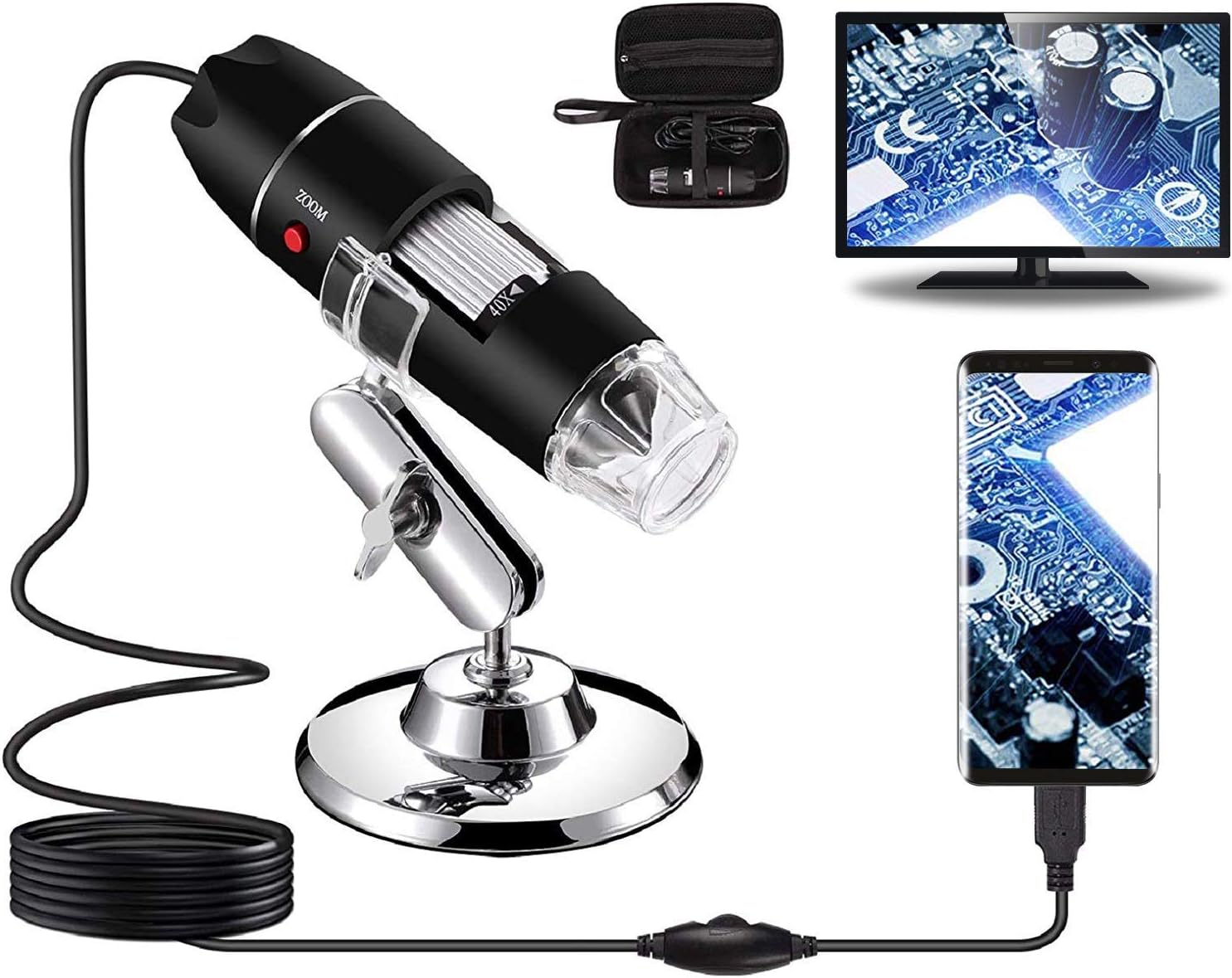
This Bysameyee USB microscope review lands on a clear CONSIDER: the Bysameyee earns its spot as the #1 best-selling lab USB microscope on Amazon by nailing the basics — 40x to 1000x magnification, 8 adjustable LEDs, a metal stand, and a carrying case, all bundled together at a budget price. The catch, buried in the manufacturer’s own product description rather than the headline bullets, is that the “capture, record & measure” features it’s marketed on only work fully on Windows — Mac and Android users lose functionality, and iPhone owners are locked out entirely. Whether this is a smart buy comes down almost entirely to which device you plan to plug it into.
✅ Pros
- 40x-1000x magnification range covers coins, insects, skin, hair, and PCB inspection in one device
- 8 built-in LEDs with a dimming wire control knob for soft, non-dazzling lighting
- Included metal stand holds the camera steady for hands-free viewing and screenshots
- Comes bundled with a carrying case, OTG adapter, ruler, and driver — a complete kit out of the box
- #1 Best Seller in Lab USB Microscopes with 14,966 ratings and a 4.0-star average
❌ Cons
- Snap, zoom, and measurement software only work reliably on Windows — Mac and Android lose functionality
- Not compatible with iPhone or iPad at all
- Mac users are pushed to third-party fallback apps (Photo Booth, Quick Camera) instead of dedicated software
- Listing’s “Compatible Devices” spec says “Smartphone” while the bullet copy requires Android OTG support specifically — confirm your device before buying
What to Look for in a USB Digital Microscope
Magnification range is the first spec buyers chase, but it’s only useful if the lens stays sharp across that range. The Bysameyee lists 40x-1000x, which covers the two jobs most USB microscope buyers actually have: low-power inspection of coins, PCB traces, or insects, and high-power close-ups of skin, hair, or fibers. Illumination matters just as much — a fixed-brightness LED ring washes out reflective surfaces like solder joints or metal coins, so an adjustable dimming control, like the wire knob on this unit’s 8-LED ring, is a genuine usability feature rather than a spec-sheet checkbox.
The other factor that separates a good USB microscope from a frustrating one is software and OS compatibility — a detail that’s easy to skim past in a bullet list but that determines whether the “record and measure” features on the box actually work on the computer you own. Build quality (metal vs. plastic housing) and the accessory bundle (stand, case, calibration ruler) round out the decision; a stand that lets you keep both hands free for soldering or slide prep is worth more in practice than an extra 200x of claimed magnification. For a side-by-side look at how competing models in this price bracket stack up on these exact factors, see our USB microscopes buying guide.
Who Should Buy a USB Digital Microscope?
Students and STEM hobbyists are the core audience for this category — a USB microscope turns a laptop into a lab station for looking at plant cells, insect anatomy, or fabric fibers without the cost or bulk of a compound microscope. Parents shopping for a first “let them explore” device should weigh how much of that exploration will happen on a shared family PC versus a kid’s own tablet or phone, since compatibility gaps in this category hit that scenario directly. We cover age-appropriate picks and what to expect at each price point in our guide to microscopes for kids.
Hobbyist electronics inspectors, engineers checking solder joints, and collectors examining coins or stamps are the second major buyer group, and for them the metal stand and adjustable lighting matter more than raw magnification. Educators running a classroom station should also plan around which devices the microscope will actually be plugged into, since a class set of iPads or Chromebooks changes the compatibility math significantly.
Who This Is For
This is the right pick for a Windows PC owner who wants a cheap, capable inspection camera for coins, PCBs, insects, or skin close-ups and needs the full snap/zoom/measurement toolset working out of the box. It’s a weaker fit for anyone whose primary device is an iPhone, iPad, or a Mac that depends on the built-in measurement software, since those users get a noticeably reduced feature set despite the listing’s broad “compatible” claims.
Full Specifications
| Spec | Value |
|---|---|
| Light Source Type | LED |
| Magnification Maximum | 1000x |
| Voltage | 5 Volts |
| Compatible Devices | Smartphone |
| Objective Lens Description | 40x-1000x |
| Power Source | Corded Electric |
| Item Weight | 0.57 Pounds |
| Enclosure Material | Metal |
| Color | Silver |
| Model Name | Microscope-1000x |
| Brand | Bysameyee |
| Manufacturer Part Number | SA-00 |
| Unit Count | 1 Count |
Optical Performance and Lighting
The Bysameyee Microscope-1000x delivers 40x to 1000x magnification through a fixed lens assembly paired with an 8-LED ring at the lens tip. That range is wide enough to move from a full-coin overview shot at the low end to a hair-strand or skin-pore close-up at the top end without swapping equipment. The 8-LED ring provides direct, even illumination onto the subject, which matters most at the high-magnification end of the range where ambient room light rarely reaches the working distance.

The Bysameyee Microscope-1000x controls brightness through a dimming wire knob built into the LED housing, letting the user dial the light down for reflective subjects like coins or solder and up for dimmer, matte subjects like fabric or skin. Shining the LEDs through a diffuser rather than exposing bare emitters keeps the light soft across the subject instead of creating a harsh hotspot, which is a meaningful detail on a microscope in this price bracket where lighting is often an afterthought.
Compatibility and Software
The Bysameyee Microscope-1000x connects over a corded 5-volt USB link to Windows XP/Vista/7/8/10, Mac OS X 10.5 and above, Linux kernels 2.6.26 and above, and Android phones with OTG (USB On-The-Go) support — a hardware standard maintained by the USB Implementers Forum that lets a phone act as a USB host for peripherals like this camera. Buyers on Android should confirm OTG support before purchase, since not every phone implements it, using a dedicated checker app as the listing itself recommends. Full technical detail on how OTG signaling works is available from the USB Implementers Forum.
The Bysameyee Microscope-1000x restricts its full snap, zoom, and measurement feature set to Windows through Amcap, its bundled capture software, while the focus wheel itself works mechanically on every supported platform regardless of software. Mac users fall back to Apple’s Photo Booth or a third-party app like Quick Camera for basic capture, and Android users rely on whatever camera or webcam app their OTG connection surfaces — neither route restores the measurement functionality that Windows users get natively. This microscope does not work with iPhone or iPad under any configuration.
Build Quality and Included Accessories
The Bysameyee Microscope-1000x houses its optics and electronics in a metal enclosure rather than the all-plastic shells common at this price point, which adds durability for a tool that gets handled, dropped, and passed between hands in a classroom or workshop setting. At 0.57 pounds, the camera body stays light enough to hold steady one-handed for lower-magnification shots.
The Bysameyee Microscope-1000x ships with a metal stand, an OTG adapter for Android connections, a calibration ruler, driver media, and a carrying case, covering the accessories most buyers would otherwise need to source separately. The stand in particular converts the handheld unit into a fixed-position setup for repetitive inspection work — soldering, coin grading, or slide viewing — where holding the camera by hand for extended periods isn’t practical.
What Customers Say
The Bysameyee USB microscope holds a 4.0 out of 5 star average across 14,966 ratings, a large enough sample to be meaningful even without a full sentiment breakdown. This particular data pull did not return individual review text, so we can’t attribute direct quotes to verified buyers here — we’d rather flag that gap plainly than invent quotes that didn’t come from the listing. What the aggregate number does tell you: at 4.0/5 with nearly 15,000 ratings, the product is solidly reviewed rather than exceptional, and category experience suggests a 4.0 average at this volume usually carries a real tail of lower-starred complaints, most commonly tied to focus consistency, driver installation, or the platform limitations documented in the listing itself.
Because no individual review text was available, we can’t rate fake-review risk for this listing as LOW, MEDIUM, or HIGH — reporting a specific risk level without the underlying review data would itself be a fabricated conclusion. If you want to sanity-check the review pool yourself before buying, the FTC’s guidance on identifying fake reviews is a solid starting point for spotting vague praise, review-bombing patterns, or suspicious verification clustering.
Final Verdict
CONSIDER: the Bysameyee USB microscope is a strong buy if you’re running Windows and want the full snap/zoom/measurement toolset with a metal stand, adjustable lighting, and a complete accessory kit at a budget price — but it drops to a conditional buy at best for Mac, Android, or iPhone users, who lose meaningful functionality the listing markets as standard. Confirm your device’s compatibility, especially OTG support on Android, before you check out.
Frequently Asked Questions
Does the Bysameyee USB microscope work with iPhone or iPad?
No. The listing explicitly states this microscope does not work with iPhone or iPad under any configuration. It’s built around USB and OTG connections that Apple’s mobile devices don’t support.
Do I need special software to use the snap, zoom, and measurement features?
Yes, on Windows. The full feature set runs through Amcap, the bundled Windows capture software, or the system-integrated webcam app on Windows 10. Mac and Android users can capture images through fallback apps, but the dedicated measurement software is Windows-only.
How do I check if my Android phone supports OTG for this microscope?
The manufacturer recommends downloading a free app called “USB OTG Checker” to confirm your phone supports USB On-The-Go before connecting the microscope. Not every Android device implements OTG, so this check is worth doing before you plug in.
What’s included in the box with the Bysameyee USB microscope?
The kit includes the microscope camera, a metal stand, an OTG adapter for Android connections, a calibration ruler, driver media, and a carrying case for storage and transport.
Can I control the brightness of the 8 LED lights?
Yes. A dimming wire control knob built into the LED housing lets you adjust brightness, and the light passes through a diffuser so it stays soft rather than glaring on the subject.
What’s the maximum magnification, and what can I inspect with it?
The listed range is 40x to 1000x, wide enough for full-object overview shots of coins or insects at the low end and close-up detail on skin, hair, or fibers at the high end.
Why does the listing mention both “Smartphone” compatibility and an iPhone exclusion?
The technical spec sheet lists “Compatible Devices: Smartphone” in general terms, but the product’s own bullet points narrow that to Android phones with confirmed OTG support — iPhone is excluded outright. Treat the bullet-point wording as the accurate compatibility claim over the broader spec-sheet label.
Conclusion
The Bysameyee USB microscope earns its bestseller status by bundling a genuinely useful magnification range, adjustable lighting, and a full accessory kit at a low price — but it’s a Windows-first product wearing a cross-platform label, and buyers on Mac, Android, or iPhone should go in with clear expectations about what they’ll lose.
If you’ve used this microscope or a similar model, tell us in the comments how it performed on your setup — especially if you’re on Mac or Android, since that’s where compatibility experiences vary the most. And if you’re setting this up for slide-based specimen viewing rather than surface inspection, our guide to preparing microscope slides covers the technique you’ll need alongside it.
Originally posted 2026-07-28 09:00:00.