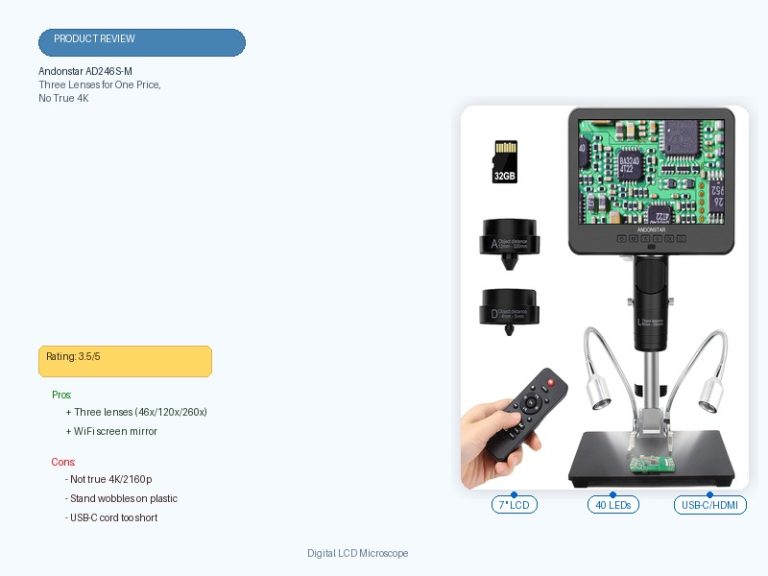
The Andonstar AD246S-M delivers on its central promise — three swappable lenses, a 7-inch LCD, and a stable soldering-grade boom-arm stand, all bundled at a price that undercuts single-lens rivals — and that combination is what makes this Andonstar AD246S-M review land on a clear buy for hobbyists. The tradeoff shows up at the edges: the marketed 2160P UHD spec only applies to SD-card recording, live viewing on the built-in screen or over HDMI never exceeds 1080p, and the zoom dial shows noticeable backlash once you push toward maximum magnification. None of that undoes the core value, but it’s worth knowing before you unbox it.

✅ Pros
- Sharp, bright image quality on both the 7″ LCD and HDMI output
- Genuinely useful across domains — soldering, coin and stamp inspection, vinyl dead-wax reading, paint-defect checks
- Strong price-to-value; buyers consistently report more build quality and lens flexibility than the price suggests
- Stable metal boom-arm stand that barely moves even when bumped mid-task
- Fast, tool-light setup — a few screws, no manual required to get running
❌ Cons
- Zoom control has noticeable backlash, especially near maximum magnification
- Live display (screen and HDMI) is capped at 1080p — the “2160P UHD” spec applies only to SD-card recording
- No USB-C HDMI alt-mode support — only a full-size HDMI cable is included
- Bundled Windows measurement software has reported crashing and auto-relaunch behavior
- Advertised magnification figures read optimistic next to real-world use, and depth of field gets shallow at high zoom
What to Look for in a Digital Microscope
Magnification range matters less than most listings suggest — what actually determines usability is how much of that range is real at the screen you’ll be looking at. The AD246S-M’s own spec sheet makes this distinction explicit: on the built-in 7″ LCD its three lenses cover roughly 4.5x to 510x, while the same lenses stretch to 18x–2040x over HDMI to an external monitor. That gap between on-device and HDMI-output magnification is worth checking on any digital microscope before you buy, since manufacturers tend to headline the larger HDMI number.
Illumination and focusing mechanics decide whether that magnification is actually usable. The AD246S-M uses adjustable LED lighting across eight intensity levels plus a wireless remote for hands-free control, and reviewers single out the focus dial as tight and precise at low-to-mid magnification, with the expected tradeoff — backlash and shallow depth of field — showing up only near the top of the range. Build quality is the last filter: a plastic desk stand flexes under a soldering iron’s heat and vibration, so a metal boom arm rated for that environment, like the AD246S-M’s, is the difference between a tool you trust and one you fight. For a broader look at how competing models stack up on these same criteria, see our guide to the best digital microscopes.
Who Should Buy a Digital Microscope?
Digital microscopes in this category suit buyers who need magnified detail without lab-grade precision or a lab-grade price: electronics hobbyists soldering through-hole and small-SMD components, collectors inspecting coins, stamps, or vinyl pressings, and detail-oriented hobbyists checking paint, stylus wear, or general household repairs. The shared thread is a need to see something small clearly on a screen rather than through an eyepiece, which is exactly what an HDMI-output model with a large built-in display is built for.
Educators and homeschool families are the other core buyer group, since a shared screen lets several people view the same specimen or circuit board at once instead of taking turns at an eyepiece. If you’re weighing which manufacturer to trust with that purchase, our rundown of the popular and best microscope brands is a useful next stop before you commit.
Who This Is For
The AD246S-M is built for hobbyist electronics repairers and solderers working down to small-SMD scale, coin and stamp collectors needing magnified detail, and homeschool users who want a shared large-screen view. It’s not built for professionals doing fine 0201-scale SMD rework or anyone who needs backlash-free focus control at maximum magnification.
Full Specifications
| Spec | Value |
|---|---|
| Light Source Type | LED |
| Real Angle Of View | 178 Degrees |
| Magnification Maximum | 2040x |
| Voltage | 240 Volts |
| Compatible Devices | Laptop, Television |
| Objective Lens Description | Achromatic |
| Power Source | Corded Electric |
| Item Dimensions L x W x H | 12.99″L x 6.69″W x 11.02″H |
| Item Weight | 2.25 Kilograms |
| Enclosure Material | 7” LCD display, HDMI output, Metal, Windows PC output |
| Color | Digital Microscope-7″ (HDMI) 3 Lens AD246S-M |
| Model Name | AD246S-M |
| Manufacturer Part Number | AD246S-M |
| Brand | Andonstar |
| UPC | 616361263000 |
Optical Performance and the Three-Lens System
The Andonstar AD246S-M covers a wide working range through its three interchangeable lenses — Lens A for coins, parts, and general macro work, Lens D for biological slides, and Lens L for fine soldering — swapped in seconds via thumbscrews rather than a separate purchase per lens. The AD246S-M delivers its highest stated magnification, 2040x, only through the Lens D path over HDMI to an external monitor; on the 7″ built-in screen the same lens tops out closer to 510x, and reviewers consistently describe the advertised ceiling as more optimistic than what shows up during actual use.

The AD246S-M outputs 2160P UHD video only to its SD card, while both the built-in LCD and the HDMI feed cap at 1920×1080 — a distinction one UK-based reviewer confirmed directly after testing a 0201 resistor over a 55″ HDMI display. The AD246S-M achieves a 178-degree real angle of view through its achromatic objective lens design, which several buyers credit for image clarity that outperforms the unit’s price point, particularly when viewed on an external monitor rather than the built-in screen. For readers who want a deeper technical grounding in how achromatic objectives and angle of view affect image quality, Andonstar’s own product documentation at andonstar.com covers the lens specifications in more depth.
Build Quality and Stand Stability
The Andonstar AD246S-M anchors its lens head to a metal boom-arm stand rated for high-temperature environments, which is the detail that separates it from desk-clamp competitors when a soldering iron is running underneath it. Buyers who’ve bumped into the rig mid-task report it barely moves, and the stand adjusts front-to-back, side-to-side, and by angle to accommodate larger PCBs and workpieces than a fixed-arm design allows.
The AD246S-M loses some polish at the extremes of its adjustment range: several reviewers note the focus and height mechanisms require patience to dial in precisely, needing small back-and-forth corrections rather than settling on the first try, and the stand’s steadiness under strain lightens somewhat at maximum magnification. At 2.25 kilograms with a 7″x7.8″x13″ footprint, it still sits solidly on a workbench, and the flex-arm LED lighting — rather than lights mounted on the lens housing — avoids the glare problems reviewers report on competing designs.
Ease of Use, Software, and Accessories
The Andonstar AD246S-M sets up with a handful of screws and no real need to consult the included instructions, according to multiple buyers who had it running within minutes of opening the box. The kit ships complete: three lenses, a slide holder, five prepared biological slides, a 32GB microSD card, USB and HDMI cables, a wireless remote, an observation box, and tweezers — enough to start soldering, viewing slides, or recording video without a separate purchase.
The AD246S-M connects to a Windows PC through bundled measurement software for length and area calculations, though several buyers report the software crashes intermittently and requires relaunching, with the built-in screen continuing to function as a fallback in the meantime. The wireless remote handles digital zoom and image controls at a distance, but its range is short enough that one reviewer flagged it as impractical for a teacher operating from across a classroom — worth factoring in if group demonstration is the primary use case.
What Customers Say
The AD246S-M holds a 4.6 out of 5 average across 1,229 ratings, with Amazon’s aggregated review attributes skewing strongly positive — Versatility comes back 100% positive and Value for Money 90% positive, while Zoom (67% positive) and Adjustability (70% positive) are the two areas buyers most often flag as falling short. “I was surprised by the quality of the microscope. The picture quality is amazing,” one reviewer wrote after buying it to solder 0402-scale components. Another verified buyer put it more bluntly: “The price to value is off the charts. I thought I would have to spend double the price to receive this quality.” A third, less enthusiastic reviewer summed up the zoom complaint shared by others: “Works OK. Pictures OK. Zoom control has tons of backlash.”
The review sample shows no signs of manipulation — reviews span multiple countries and languages with specific, non-templated use cases, and every review sampled carries a Verified Purchase badge. Readers wanting a general framework for spotting manipulated reviews on any listing can check the FTC’s endorsement guides for what legitimate reviews should and shouldn’t look like.
Final Verdict
BUY — for the hobbyist soldering, collecting, or homeschool use case this is built for, the AD246S-M’s three-lens bundle, stable boom arm, and sharp HDMI image outperform its price point, and the well-documented gaps (1080p live resolution, zoom backlash near maximum magnification, occasional software crashes) are manageable rather than dealbreaking for that buyer. Anyone shopping specifically for true 4K live viewing or backlash-free precision at the extreme top of the magnification range should look elsewhere.
Frequently Asked Questions
Does the Andonstar AD246S-M actually record in 4K?
Only to the included microSD card. The “2160P UHD” spec applies to saved video files, not to what you see live — both the 7″ built-in screen and the HDMI output are capped at 1920×1080 resolution.
Which lens should I use for soldering small components?
Lens L is marketed for soldering and repair work, but several buyers found Lens A more practical for everyday electronics tasks since Lens L’s tighter field of view can feel too zoomed in; Lens A gives a wider view of the board with room to digitally zoom in when needed.
Is the bundled PC software reliable?
Reviewers report it crashes occasionally and needs relaunching, though it typically auto-relaunches on its own. The device still functions independently through its built-in 7″ screen or HDMI output if you’d rather skip PC-tethered use entirely.
Does the boom-arm stand handle soldering heat?
Yes — the stand is built from metal specifically rated for high-temperature environments like soldering, and buyers report it stays stable even when bumped mid-task.
How far away can I use the wireless remote?
Not very far. At least one reviewer noted the remote needs to be close to the unit to register, which limits its usefulness for group or classroom demonstrations from across a room.
What’s included in the box?
The microscope host, all three lenses (A, D, L), a slide holder, five prepared biological slides, a 32GB microSD card, USB and HDMI cables, a switch cable, a wireless remote, an observation box, and tweezers.
Is this microscope good for coin and stamp collecting?
Yes — multiple buyers specifically bought it for coin inspection and error-coin grading, citing Lens A’s magnification range and the large 7″ screen as well-suited to examining fine detail without an eyepiece.
Conclusion
The Andonstar AD246S-M suits hobbyist solderers, collectors, and homeschool users who want multi-lens flexibility and a stable stand without paying lab-scope prices — just go in knowing the “4K” claim only applies to recorded video, and the zoom mechanism loosens up near maximum magnification. For most of the everyday use cases reviewers describe, those tradeoffs don’t get in the way of the job.
If you’ve used the AD246S-M or a similar HDMI microscope for soldering, collecting, or something more unusual, share your experience in the comments below — and if you’re curious what else a digital microscope can reveal once you start pointing it at everyday objects, our look at what grass looks like under a microscope is a good place to start.
Originally posted 2026-07-12 08:00:00.